
How to write a changelog
What is Changelog
Changelog is just a list of what's changed in a product (new features, fixes, and improvements), usually organized by version or date, so users and teams can see what's new.
Instruction for changelog creation can be found here.
Purpose
Regularly publishing changelogs is one of the simplest ways to build trust in a product. It shows users the product is actively maintained, helps them discover value they might otherwise miss, and reduces confusion when something changes. Over time, it also becomes a reliable record of how the product has evolved.
This matters differently depending on who's reading:
- For users - changelogs build confidence and drive adoption. They see exactly what's new and why it's useful to them.
- For founders and investors - changelogs show ongoing, visible progress without needing a separate status report.
Structure
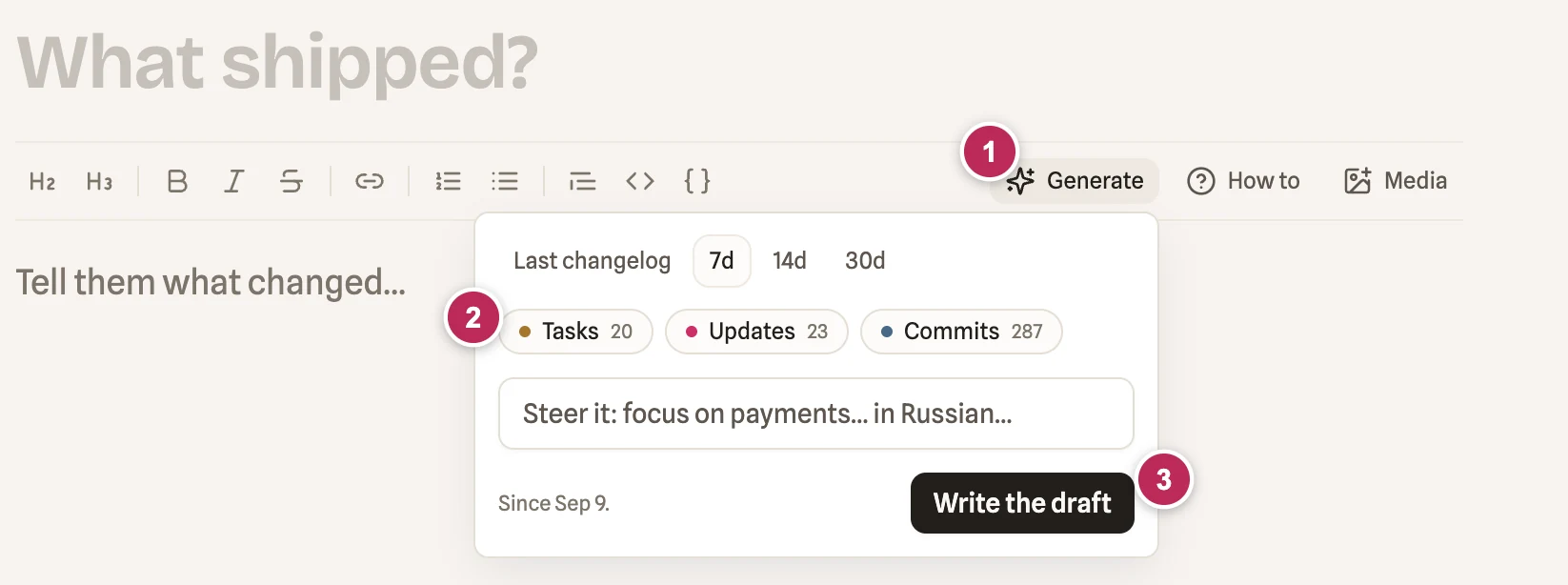
Use the AI changelog draft generator
Select your sprint's date range, list which features belong in the Major Features section, and add any other context that would help and the AI will generate a draft using tasks, updates, and commits from that period.
Note: Always review the generated draft and refine it using your own context about the features, since AI won't catch everything.
General info
-
Title – short and clear, in plain language (no jargon), e.g. Consent, Authorization & Compliance Updates
-
Main image – a screenshot showcasing the release's headline feature.
- Note: if you use the AI generator, it will also produce a main image, but this should only be used when no feature is screenshot-worthy (e.g. if the sprint was purely technical, tech-debt related or other). In all other cases, a real feature screenshot must be used.
-
Intro – a few sentences summarizing the key highlights of the release from the user value perspective, Example: This release makes it easier to see and manage what you've agreed to. Review, download, and revisit your legal documents and authorizations anytime, right in the app, with tighter verification to keep group expenses secure.
Major Features
Major features list should contain max 5 core features of release. Each feature should be presented in the following way:
- Title – short, action-based name for the feature, formatted as H2. Example: Download or Email Your Authorization
- Description - 1–3 sentences on what it does and why it matters, written from the user's value perspective. Example: Once you authorize ACH debits, you can instantly download a PDF copy or have it emailed to you, pre-filled with your personal details like account holder name, bank, account type, and last four digits, etc, so you always have a personal record of exactly what you agreed to and when.
- Visual – ideally a short demo video (max 1–2 minutes, with voiceover); otherwise a feature screenshot.
Improvements
This section lists the improvements shipped in this release.
Describe each in one line from the user's perspective (what changed for them), not just the name of the Jira/Linear ticket.
Fixes
This section lists the main fixes shipped in this release.
Describe each in one line from the user's perspective (what problem was resolved), not just the name of the Jira/Linear ticket.
Examples
https://api.paralect.co/s/pulse/live-flow-stats-pull-requests-analytics-and-ai-feed-summarie
https://api.paralect.co/s/clink/consent-authorization-compliance-updates