
Pulse tasks list
What is Pulse List?
Pulse List shows tasks from your Jira or Linear project in an easy-to-read view, organized to make weekly progress easy to track.
Two-way sync
Fully auto-synced in both directions with Jira and Linear.
Standalone use
If you're an early-stage startup without a task tracker, you can also use Pulse List on its own, as a full-fledged, standalone task manage
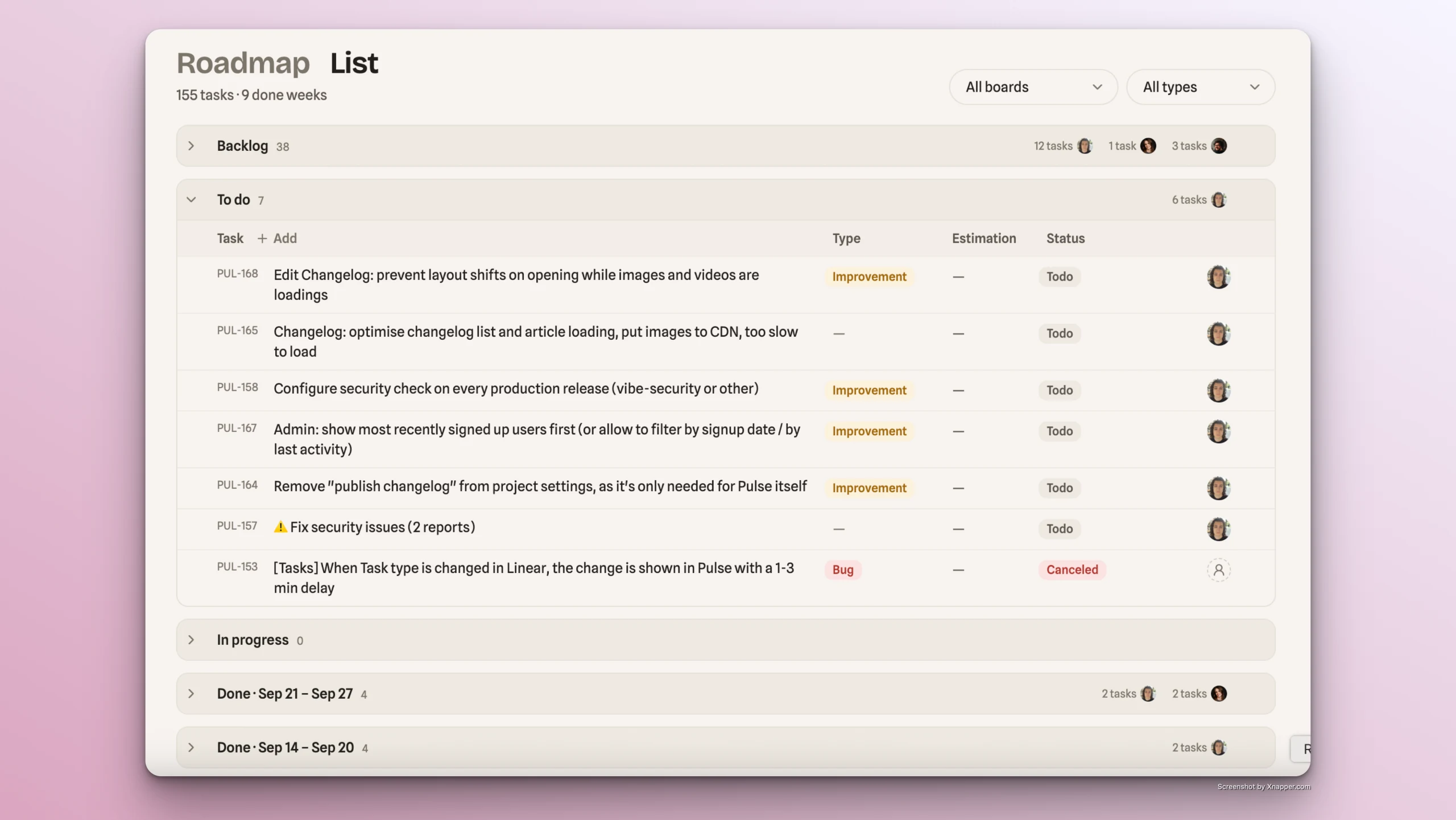
List structure
Pulse List groups tasks into the following categories (when Jira/Linear is integrated):
- Backlog - tasks in "Backlog" status, before they're ready to be worked on
- To Do - tasks in "To Do" status, ready to start but not yet picked up
- In Progress - tasks in "In Progress" or any active working status, up to but not including "Done"
- Done [weekly period] - tasks marked "Done," grouped by the week they were completed
Tasks management
Pulse List allows to do the following with the tasks:
ℹ️
Remember: when Jira or Linear is integrated, all task actions in Pulse sync automatically in both directions.
- Add new
- Edit all basic parameters: name, type, status, estimation, assignee, description
- View details (basic params above, comments, status change history)
- Open in Jira/Linear, if connected
- Swap task order in the list via drag and drop
- Delete
Task management demo